Showing posts with label Google. Show all posts

Google gives Social Networking

Something you have to admire about Google is the fact that they can be extremely persistent when they want to be. This is certainly the impression that I got when they recently announced their plans to roll out Google Plus; their latest attempt at social networking. Previously, Google had tried to enter the Social Networking scene through acquisition (Orkut), stealth (Buzz) and innovation (Wave). While, none of these brought success, they did teach Google some valuable lessons. This time, Google has dreamed big and put in a lot effort to realize that dream.

If I could describe Google Plus in one word, I might choose “intimate” because thatword seems to properly represent the philosophy behind this endeavour. To me it seems that Google has identified a fundamental reality of our average social experience: we are not the same person to everyone. Hence, it has built a system that can seamlessly allow us to customize the level of social interaction we want with different people.

There are some very impressive features that have gone into Google Plus that could really enhance the social experience. To give proper context to these features, I have compared them with Facebook.

Google Plus: Cricles
At first glance, Circles seem to be a simple method of categorizing your friends: putting relevant friends in relevant Circles. However, you can also post material and directly interact with members of a specific circle. This is great if you want to avoid mentioning the same thing to two very different groups of contacts.
For example, you could post academic material in a circle containing your study friends, while posting work material to a circle dedicated to your colleagues.

Facebook: First of all, adding friends to different friend categories only influences the chat feature. To my understanding, the best ways to customize your social experience on Facebook would be to create different groups and add relevant friends into it. Also, do not forget customizing privacy settings to allow/deny access to albums or other material. Tagging people in posts also helps.
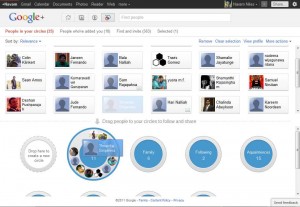
Google Plus
The problem is that this is very cumbersome. Most of us are in at-least a dozen groups and sooner or later people lose interest in interacting within groups because the primary method of keeping tabs is through the news feeds. Even this feature is not the best because it does not do a good job filtering out the people I am less interested in (the only option is blocking them out, which is something people are hesitant to do). Also, blocking out some content could really offend some people. Tagging people does help, but that also draws everyone’s attention, not just the ones you tag.

The Verdict: Circles are just simple; add your friends to a circle and you are good to go. The privacy, the posts and the entire social interaction is automatically customised. In comparison, Facebook is more complex and even though it does deserve credit for simplifying the privacy settings, it is still very complicating and still requires a lot of micro management.

Google Plus: Hang out
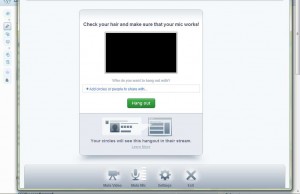
This feature allows users to invite specific contacts or even entire Circles to a video conference. What I like about this is the fact that different participants can invite different people to the conference. The total capacity is actually 25.
Facebook: When I started writing this article, Facebook just announced that it would allow Skype video chats. However, judging by the initial feedback the video quality does not seem to be very good.

Verdict: In its current form, Facebook is structurally incapable of rolling out something similar to Hangout. It would require a completely new approach to the chat interface in general. Skype is wonderful as a standalone app, but efforts to integrate it into Facebook or other platforms will not provide satisfactory results overnight. Meanwhile, Google already has a lot of experience with audio and video services via Google Voice and its own Google Talk.

Google Plus: Instant uploading
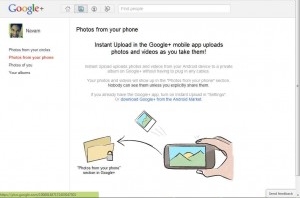
A lot of our pictures and videos are still lingering in our cameras and smartphones and some may never grace Facebook because we may simply be too lazy or too busy to upload them. Google’s instant upload solves this problem by automatically uploading all your pictures and videos to a private Google+ album. Later, you can decide on editing or posting it. Unfortunately, this is only available for Android phones right now.
Facebook: As far as I know, there is no comparable feature.
The Verdict: Google+ is the clear winner here.

Google Plus Pictures
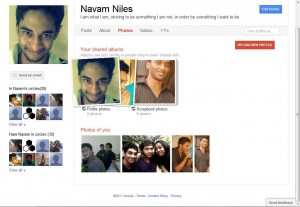
Adding and tagging pictures is very similar to Facebook. However, Google’s interface with regards to editing and commenting is somewhat different. Also, as mentioned earlier, you can post pictures directly to different Circles. This means you do not have to go through the added problem of customizing privacy settings and offending people in the process.
Facebook: The only option is to upload pictures to different groups. However, as I mentioned earlier, this is a very cumbersome process especially because people tend to interact very little on groups. Circles in comparison make the specific social interaction more flexible and meaningful.

The Verdict: Uploading and sharing pictures on Google+ is easier but the only real difference is because of Circles. There are added features but I am not giving it too much credit for this feature.

Google Plus spark
An exciting name for a rather bland feature. Sparks allows you to add your interests (eg. Technology, history, fashion, etc.) and allows you to share and comment on these sparks with your Circles or other friends.
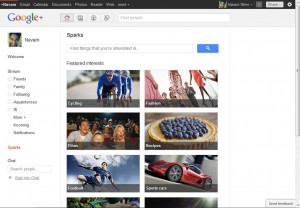
Facebook: posting links on your profile or adding interests to your profile list is quite similar to sparks. There is no great difference here.

The Verdict: I suppose I saved the last for the least, even on Facebook, I doubt people pay a lot of attention to the “interests” on the profile page. However, the only difference with Google+ is that you can post directly to your Circles, which might make the experience better but by itself, it is not much.

Google Plus: Social Sharing
Just like with the Facebook button, you can now add a Google +1 button to your pages. With Facebook it shares the link on your Facebook wall. With the +1 button, it shares the link on your Google Plus page… but unlike the Facebook button, the +1 potentially influences search results when people in your circles searches Google for related terms. This is how the buttons look like… If you’d like to click each of them once, to share this article, that would be much appreciated!

Google Plus: Huddle
This allows group chats across different platforms such as mobile (also currently restricted to Android) and PC. Users can initiate chats directly with specific Circles or friends. There are 3rd party apps that allow this sort of flexibility but as far as I know, this is the first time it has been fully integrated into a single social networking system. Facebook: The chat interface has improved and now you can initiate group chats. One thing I personally dislike is that Facebook displays chat histories and messages together. This really makes it difficult for me to keep track of anything properly.

The Verdict: Google’s chat interface is very simple and hopefully it will probably incorporate the experience it has gained through Gmail Chat. If it does, we are looking at a much better chatting experience. Chat histories are saved into the “chats” on the Gmail page.

I know I have not gone into the nuts and bolts of some of these features but I hope this gives people a good understanding of what Google Plus is all about. If there were anything you guys would like to contribute, please let me know. Also, I am interested to know how many of you are willing to switch over from Facebook and if so, why?

Google+

Google To Revive Realtime Search, Thanks to Google+
Realtime Search was, until last month, the search giant’s method of delivering relevant data from Twitter, Facebook and other social media services in real time. Whenever a major current event made headlines — such as Osama bin Laden’s death — Google Search would start displaying tweets and Facebook updates from users talking about the recent developments. It made Google‘s search engine more relevant during major world events.

It didn’t last, though. Google took Realtime Search down in July after it failed to come to an agreement with Twitter for continued access to Twitter‘s firehouse of data. Without a constant stream of tweets, the product was far less useful.

“The value the product was providing was not enough,” Google Fellow Amit Singhal said about the decision to turn off the feature during a search panel in Mountain View, California.

When asked about if or when Realtime Search would return, Singhal responded by saying the Google Search team is “actively working” on bringing the product back. He added that the team was experimenting with adding data from Google+ and other sources. It seems as if Google doesn’t believe it needs Twitter data to deliver a compelling real-time search offering.

Danny Sullivan, the panel’s moderator and Search Engine Land editor in chief, also asked the panel why the Google+ stream doesn’t have its own search engine (it’s one of the social network’s most requested features).

Google Gloogle Brand

Google, Gloogle, and the Brand
So, today an odd thought popped into my head. I started thinking about what would be a good name for a new search site. This is a little thought experiment I like to do; just a little free association to waste some time on a Saturday afternoon! Suddenly the name gloogle popped into my head. Hey, I figured, at least some of their success came about because of their unique name right? Maybe I could mimic that! Well, anyway, the name gloogle .com is taken.

That seems to be a common occurrence. Someone has bought a domain name, but there is no website there. My interest is piqued! I gathered the whois information. The domain is registered to Google by a company called MarkMonitor, a company that helps people protect their brands on the internet. Of course, that makes sense. But there are a few things I don't understand. First, why don't they redirect the page to the main Google site? They spent the money to buy the domain and it just sits there. Next, they bought the .com and .net names, but not the .biz or .us or any of the other obscure extensions.

It's just just interesting to think about the decision process here. They don't want to diminish their brand by pointing misspelled names to their domain, This is understandable. They have a unique place on the web. To keep that brand strong, they have to minimize confusion with what their true identity is.

Also, there is economics at work here. They must budget a certain amount of money towards protecting their brand. The higher priority given to misspellings and names that someone would most likely want to use against them. There must be some ;egal reasoning here. For example, if Google already has gloogle.com and a person comes along and tries to develop gloogle.biz, then Google has already proven that the term gloogle could be considered an infringement on their trademark.

Next, consider the clever people that work on figuring this out. It really shows some ingenuity. More ingenuity, really, then the person that thinks they can set-up a site and mimic Google. These people foresaw the behavior of their fellow humans and planned a way to mitigate whatever effects those fellows might cause. Very clever, I think.

Google Wave


Today has been dominated by news and excitement surrounding Google Wave, Google’s new real-time communication platform that will launch to the public on September 30th. In fact, there’s been so much buzz that you might just not have enough time to read the thousands of articles being released on Google’s biggest product launch in recent memory.
To make sense of it all, we have compiled key information, definitions, and links related to the launch of Google Wave. This in-depth guide provides an overview of Google Wave, discusses the terminology associated with it, details information on Google Wave applications, (i.e. the Twitter Wave app Twave), and goes over ways to keep yourself informed. We know you’re excited about Google Wave, so here’s what we think you should know:

What is Google Wave?


Google Wave Image

While we suggest reading our article on the launch of Google Wave for more detailed information, here’s the sum of it: Google Wave is a real-time communication platform. It combines aspects of email, instant messaging, wikis, web chat, social networking, and project management to build one elegant, in-browser communication client. You can bring a group of friends or business partners together to discuss how your day has been or share files.
Google Wave has a lot of innovative features, but here are just a few:
- Real-time: In most instances, you can see what someone else is typing, character-by-character.
- Embeddability: Waves can be embedded on any blog or website.
- Applications and Extensions: Just like a Facebook application or an iGoogle gadget, developers can build their own apps within waves. They can be anything from bots to complex real-time games.
- Wiki functionality: Anything written within a Google Wave can be edited by anyone else, because all conversations within the platform are shared. Thus, you can correct information, append information, or add your own commentary within a developing conversation.
- Open source: The Google Wave code will be open source, to foster innovation and adoption amongst developers.
- Playback: You can playback any part of the wave to see what was said.
- Natural language: Google Wave can autocorrect your spelling, even going as far as knowing the difference between similar words, like “been” and “bean.” It can also auto-translate on-the-fly.
- Drag-and-drop file sharing: No attachments; just drag your file and drop it inside Google Wave and everyone will have access.
While these are only a few of the many features of Google Wave, it’s easy to see why people are extremely excited.
Google Wave was the brainchild of a team based out of Sydney, Australia. The core team members are two brothers, Jens and Lars Rasmussen, and lead project manager Stephanie Hannon, all of whom were involved in Google Maps previously. Google Wave was announced today at Google’s I/O Developer conference, although the product will not be available to the public for several months.
We detail even more of these features in our article The Top 6 Game-Changing Features of Google Wave.

Terminology


Wave Entitles Google Image

Google Wave actually has its own lingo – yes, you have to learn a few definitions if you’re going to really understand this new communication platform. Having knowledge of these terms will help you understand more about Google’s newest project.
- Wave: A wave, specifically, refers to a specific threaded conversation. It can include just one person, or it can include a group of users or even robots (explained below). The best comparison I can make is that it’s like your entire instant messaging (IM) history with someone. Anything you’ve ever discussed in a single chat or conversation is a wave.
- Wavelet: A wavelet is also a threaded conversation, but only a subset of a larger conversation (or a wave). It’s like a single IM conversation – a small part of a larger conversation and a larger history. Wavelets, though, can be created and managed separately from a wave.
- Blip: Even smaller than a Wavelet, a Blip is a single, individual message. It’s like a single line of an IM conversation. Blips can have other blips attached to them, called children. In addition, blips can either be published or unpublished (once again, it’s sort of like typing out an IM message but not yet sending it).
- Document: A document actually refers to the content within a blip. This seems to refer to the actual characters, words, and files associated with a blip.
- Extension: An extension is a mini-application that works within a wave. So these are the apps you can play with while using Wave. There are two main types of extenisons: Gadgets and Robots
- Gadgets: A gadget is an application users can participate with, many of which are built on Google’s OpenSocial platform. A good comparison would be iGoogle gadgets or Facebook applications.
- Robots: Robots are an automated participant within a wave. They can talk with users and interact with waves. They can provide information from outside sources (i.e. Twitter) or they can check content within a wave and perform actions based on them (i.e. provide you a stock quote if a stock name is mentioned).
- Embeded Wave: An embeded wave is a way to take a Google Wave and the conversation within it and place it on your website. Users could use this as a chatroom, as a way to contact you, or for something more.

Wave Gadgets


Google Wave Gadgets Image

A Wave Gadget is one of two types of Google Wave extensions. Gadgets are fully-functional applications. According to Google, gadgets are primarily for changing the look and feel of waves, although this seems to only scratch the surface of the potential of a wave gadget.
First: almost any iGoogle or OpenSocial gadget can run within Google Wave. That means thousands of applications that have been already created will work in Google Wave. Second: a gadget built within Google Wave can take advantage of live interaction with multiple users. This means something like a live online game with active participation from all users. In that way, it has similarities to Facebook or MySpace applications, which take advantage of your friend network to make games, quizzes, and applications more meaningufl and useful.
Gadgets are specific to individual waves, rather than to specific users. Thus, it’s not like having a Facebook app on your profile – the gadget belongs to everyone within the wave. They also do not have titles, to better integrate with the actual conversation. Some of the gadgets already built include a Sudoku gadget, Bidder (which turns your wave into an auction), and Maps (which allows for collaboration on a Google Map).
For a more technical explanation, be sure to check out Google’s Wave Gadgets Tutorial.

Wave Robots


Google Wave Robots Image

Robots are the other type of Google Wave extension. Robots are like having another person within a Google Wave conversation, except that they’re automated. They’re a lot like the old IM bots of the past, although far more robust. Robots can modify information in waves, interact with users, communicate with others waves, and pull information from outside sources.
Because it acts like a user, you can define its behavior based on what happens in the chat. You could build one as simple as “change the word dog to the word cat” or one as complex as a fully-functional debugger. We’ll probably start seeming some very advanced robots in the near future.
Some of the robots already in service include Debuggy (an in-wave debugger), Stocky (which pulls stock prices based on stock quote mentions), and Tweety (the Twave robot, which displays tweets inside of a wave).
A more advanced explanation is available at Google’s Wave Robots Overview. We also have an inside look at Google Wave extensions and robots.

Wave Embeds


Google Wave Embeds Image

Wave embeds are a little more complex than embedding a YouTube video onto your blog, yet in the end, that’s really what Google Wave Embeds are: a way to take Google Waves onto a third party website. Embedded Waves support many of the functions of the actual Google Wave client, including dragging-and-dropping files.
While the Wave Embeds is still very early stage, Google has already built two: YouTube Playlist Discuss and Multiple Extensions Embed. The former allows you to discuss a YouTube video via a wave and the latter allows for interaction with multiple waves on the same page.
One possibility: Google Wave Embeds may be a real-time replacement to static comments. If Google perfects wave embeds, you could even see YouTube.com comments replaced with waves, although it is way too early to make any calls on the potential of this.
Google’s Wave Embed Developer’s Guide has more advanced information embedding waves.

Furthering your Google Wave education


Google Wave Logo
The Google Wave Logo

Still can’t get enough of Google Wave? This collection of links and articles will help you understand this new product even better: